Welcome to the Week (week 2): The Jungle (1906) by Upton Sinclair Chapter 1-4

Greetings!

This is the first “Welcome to the Week” video. For the week of January 31 and February  2, you (students) are expected to watch this video and comment reply by 5:00 pm on Jan 31st.

This post includes details for making “Welcome to the Week” posts in the future, but you are not required to make one for Jan 31st. Students will sign up to do “Welcome to the Week” on February 7th in class/through a provided google online form (forthcoming as of Jan 230 2023) for dates starting February 14 to the end of the semester.

This video is intended to guide discussion over the week and provide a foundation for our engagement with the text. My video is a little more robust (check out my mild video editing skills). Moving forward, how will you (students) create your videos for the class and for the assessment? See the rubric linked here “Expectations and Rubric for Welcome to the Week Assignment”

Below is the Welcome to the week video. Please respond with a comment reply to at least ONE of the questions featured in the video (note they are offered throughout to encourage you to watch all 14 mins).

In Class Activity ( and extra credit opportunity) Jan 26 Mucking NYC Novel

An NYC Muckraking novel

In class, we will discuss how Upton Sinclair’s novel, The Jungle, fits into a unique period genre called “muckraking.” Muckraking is a term coined by President Theodore Roosevelt to describe the investigative journalists of the Progressive era who wrote sensationalist pieces on social issues to compel the public and institute change.

In groups of 3,  create NYC Muckraing novel titles and descriptions. To do so:

  1. Choose one of the following New York City social issues that might be unique to our class or come up with your own
    • Rent
    • MTA
    • Baruch Registrar
  2. Describe your main character and how he is connected to the issue.
  3. Briefly describe some events in your novel (2-3 sentences)
  4. On the provided paper, write the title, and draw a cover, and list group member names (first and last). Snap a pic and upload to class Google doc accessed on Blackboard (click here) to the file “Muckraking NYCToday.”
  5. In the last 5 mins of class, 2 people from each group will explain the book in 2 mins.
  6. We will vote for the “best” or most intriguing book. The winning group will be asked to post the image of their book cover and description by the next class and will get 2pts added to their participation grade (you cannot vote for your own group lol).
  7. VOTE: Take a scrap piece of paper write your name, your fellow group members, the title of your group’s book, and then the title you are voting for.
  8. Give your vote to the Professor at the end of class. This is your “exit ticket” and counts as both attendance and participation.

Using Hypothes.is and Annotating

TLDR (Too long didn’t read)


Throughout the semester we will be annotating several articles with an online tool called Hypothes.is. Hypothes.is can be used publicly or in private-facing groups. We will be annotating in a group so our annotations are only visible to our class. Read the directions below.

IMPORTANT NOTE: Hypothes.is annotation works MUCH BETTER on a computer or tablet. It DOES NOT work well on a phone.

Why We Annotate

In this class, reading is not a passive activity. Using annotation we will comment on the texts as we read them. We will be able to read and respond to each others comments, AKA annotations. A few guidelines for annotating are below.

General annotation advice–> Annotate passages that:

  • You think are important. Why is this part important? How does it connect to the main idea of the article? Use your annotation to share your thoughts.
  • You don’t understand. Highlight/annotate to ask a question. I bet other people have the same question or are confused too!
  • That you agree or disagree with. Highlight/annotate to tell us why.

Setting Up Hypothes.is

To join and setup Hypothes.is, follow the steps below.

Go to the Hypothes.is site, and sign up for a username. It should be your FIRSTNAME and lastname initial. For example: JessicaN

If that username is taken or if there is more than one person with a similar name, add numbers, additional letters, etc.

Once you have a username, sign in to your hypothes.is account.

How to Post a Comment on a Blog or Page (with comments enabled)

How to post a comment

  1. Click on the title of the blog post to exit scrolling mode and just see the blog by itself.
  2. Scroll down to the bottom of the blog post to where it says “Leave a Reply.” There is a comment box and a button that says “Post Comment.”
  3. Comments in this class should be at least 2-3 sentences or 50 words. Consider linking to other sites, mentioning your own post, or quoting from the blog post you are commenting on to extend the conversation.

How to Create a Blog Post

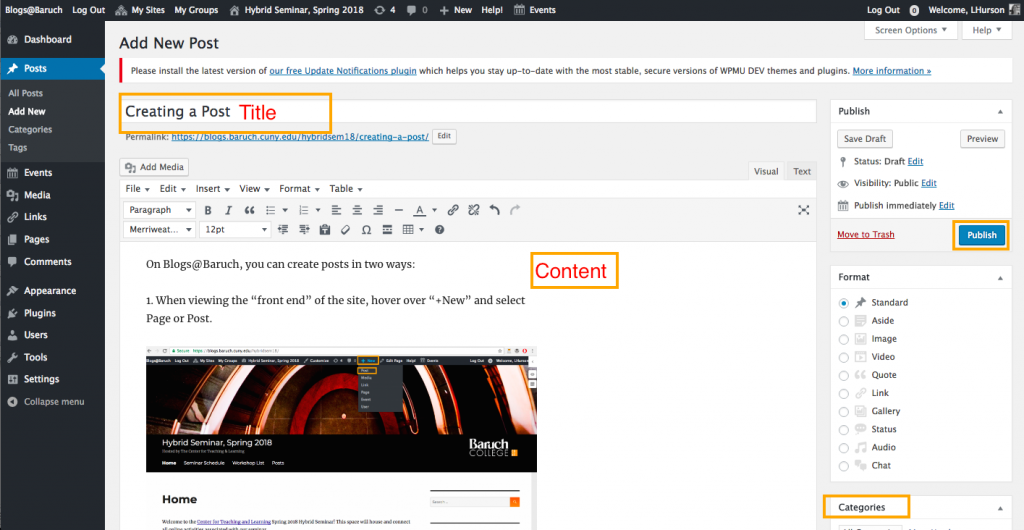
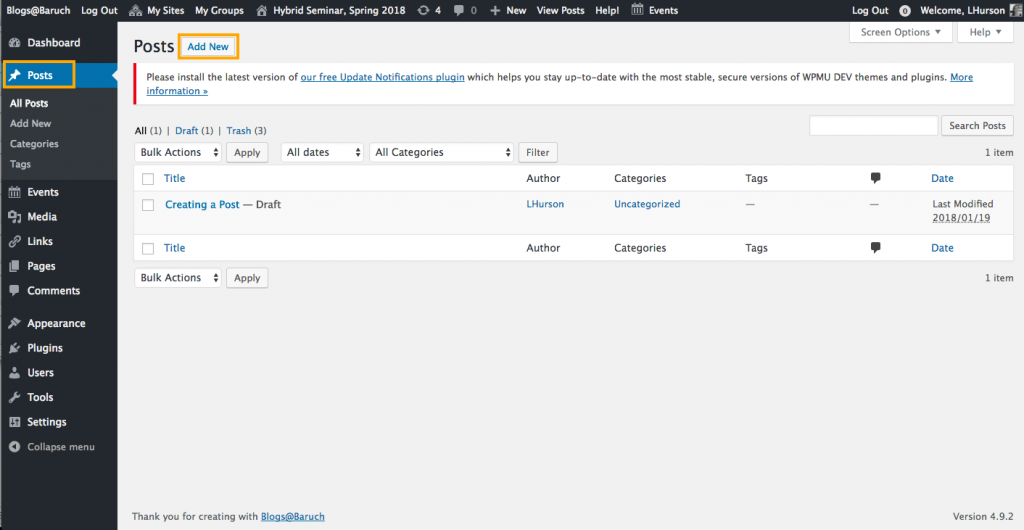
You can create posts in two ways:

1. When viewing the “front end” of the site, hover over “+New” and Post.

2. Or, in the dashboard, visit the “Posts” area and click the “Add New” button on the top left.

Once you are in the post editor, add a post title and content. Remember to categorize and tag your post. Once complete, click Publish to make it live!

You may also want to watch this brief video offering screencast version of steps to creating a blog post on CUNY Academic Commons here:

New Post!

About Posts

This is a Post. Instructors often post announcements, assignments, and discussion questions for for students to comment. Some instructors have students post assignments. Posts are listed on the “Posts” page with the newest at the top. 

Post Comments are turned on by default (see Home for information on Comments).

Add/Remove a password from this post from the Post Editor > Visibility > Edit > Password Protected.

Add/Edit/Delete a post from Dashboard > Posts